Easy Dat a Sets to Link Together
Learn data science while social distancing
How to join tables using SQL to combine datasets
Find out where magpies are the most dangerous in Australia using the SQL keywords UNION, UNION ALL, INNER JOIN, LEFT OUTER JOIN and RIGHT OUTER JOIN
Introduction
For the last 4 weeks my friends and I have been helping each other learn new skills while social distancing. We are learning data science as an online study group. We are nearly finished the SQL portion. I am so proud of everyone's efforts and how willing they have been to have a go at something new.
In the last couple weeks my parents have even decided to give my lessons a go. They only have a few weeks to catch up on, so it will be interesting to hear what they think.
Previous lesson
Last week we used data on the three albums released by the Spice Girls to determine which of the albums was the best. We did this using the GROUP BY keyword so that we could aggregate the statistics for each album.
This lesson
Now that we know how to group and aggregate data in the table, this week we will learn how to join tables together.
It is helpful to be able to combine data sets. Particularly if there are different details in each table. By joining them together you are able to do some calculations. Alternatively, you can create a new table that contains all the different details together in one dataset.
To combine tables we will use the UNION, UNION ALL, INNER JOIN, LEFT OUTER JOIN and RIGHT OUTER JOIN keywords.
Key learnings
- use the keyword UNION to stack datasets without duplicate values
- use the keyword UNION ALL to stack datasets with duplicate values
- use the keyword INNER JOIN to join two tables together and only get the overlapping values
- use the keyword LEFT OUTER JOIN to join two tables together and not loose any data from the left table, even those records that do not have a match in the right table
- use the keyword RIGHT OUTER JOIN to join two tables together and not loose any data from the right table, even those records that do not have a match in the left table
- understand the difference between the UNION and UNION ALL keywords
- understand the difference between an INNER JOIN, LEFT OUTER JOIN and RIGHT OUTER JOIN.
The problem
Everybody knows that Australia is full of dangerous animals. However, one of the lesser known predators is the magpie. This bird swoops down on unsuspecting victims, with sharp beaks well equiped to take out an eye. We want to find out how common magpie attacks are in each of the Australian states. Where do we have to wear protective headgear? 😜
The data
To solve our problem we have several tables of data.
The first is a table contains the number of magpie attacks reported from each Australian state according to the website magpie alert. It is important to note that the data on this site is crowdsourced. People self-report when they have been swooped by a magpie. Therefore there may be some biases based on where the website is most popular.
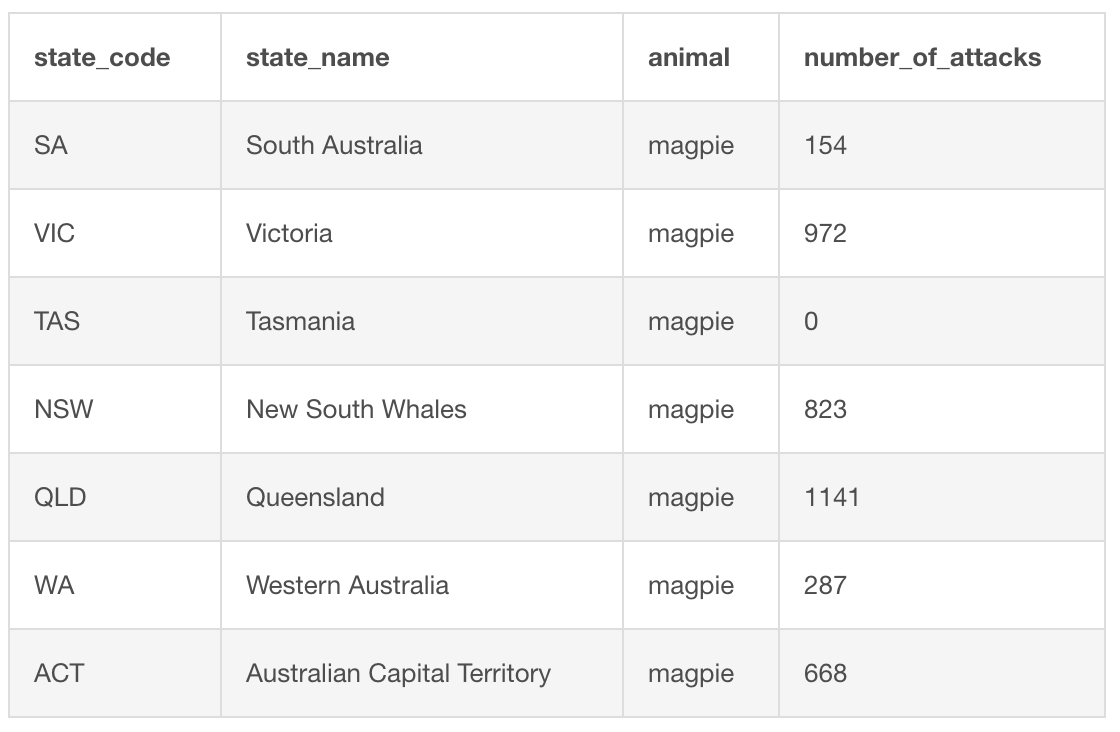
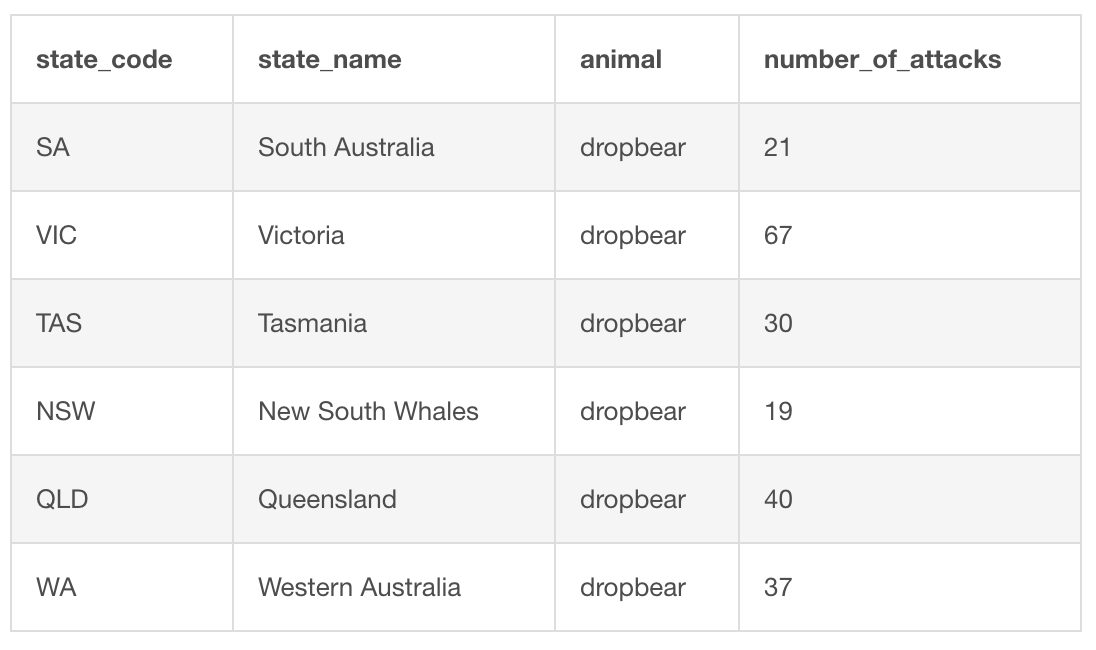
Our second set of data is a table of dropbear attacks. Dropbears are another ferocious Australian animal. We can use this table as a comparison to the magpie attacks data.
Disclaimer: dropbears are not real and so the data is made up by me 😃
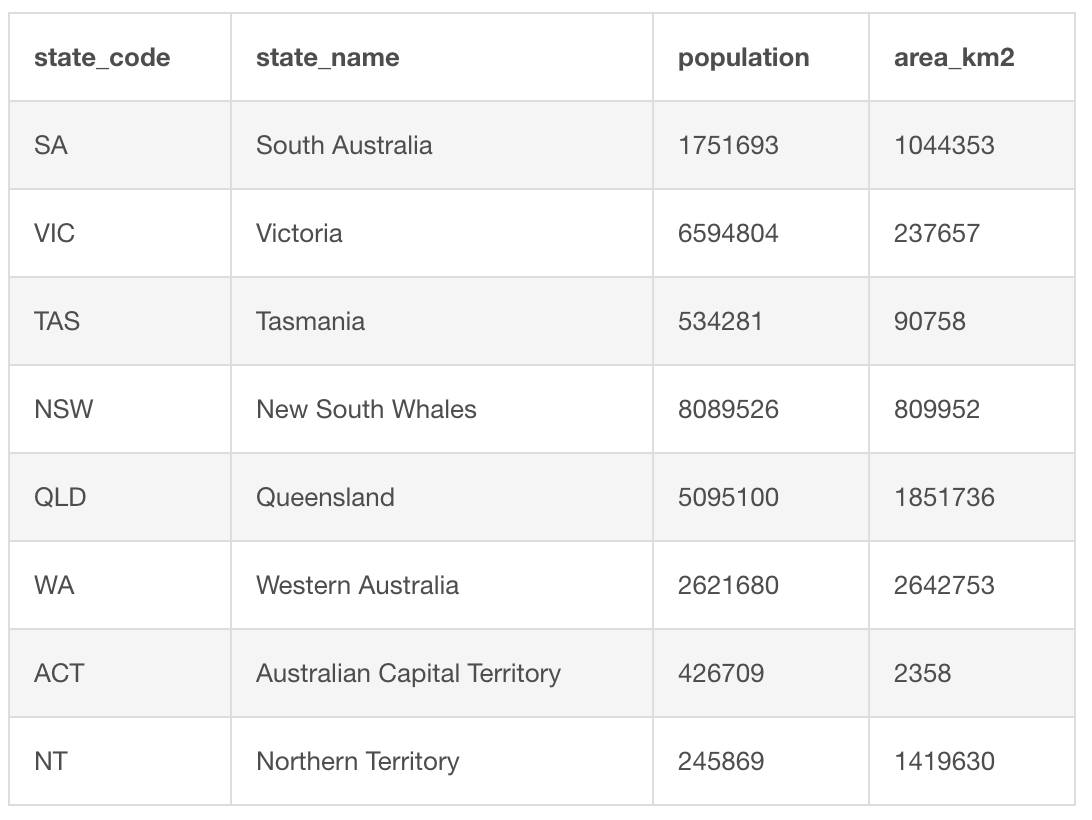
In addition to the two tables on animal attacks, we also have data on the Australian states that I got from Wikipedia. We can use this table to normalise our animal attack tables for population or area differences between the states.
Syntax to combine tables
The simplest way to combine two tables together is using the keywords UNION or UNION ALL. These two methods pile one lot of selected data on top of the other.
                      SELECT
            name_column_one,
            name_column_three
            FROM
            name_of_table_one
UNION
            SELECT
            name_column_one,
            name_column_three
            FROM
            name_of_table_two
;
The difference between the two keywords is that UNION only takes distinct values, but UNION ALL keeps all of the values selected. Both are used with the same syntax.
                      SELECT
            name_column_one,
            name_column_three
            FROM
            name_of_table_one
UNION ALL
            SELECT
            name_column_one,
            name_column_three
            FROM
            name_of_table_two
;
What if you want to combine tables based on a matching value?
There are several different ways we can combine tables based on value matching. They include the INNER JOIN, FULL OUTER JOIN, LEFT OUTER JOIN and RIGHT OUTER JOIN.
Available joins are slightly different in different versions of SQL language. We have been learning MySQL. Therefore we will focus only on the joins available in MySQL. INNER JOIN, LEFT OUTER JOIN and RIGHT OUTER JOIN, but not FULL OUTER JOIN are the ones that may be used in MySQL.
If you would like to learn how to do a FULL OUTER JOIN that is covered in one of my other articles on the difference between inner and outer joins in SQL.
What if you only want the data where both tables contain a matching value?
If you want to perform a join where you only include data where both tables contain matching values in a specified column, then you would use an INNER JOIN.
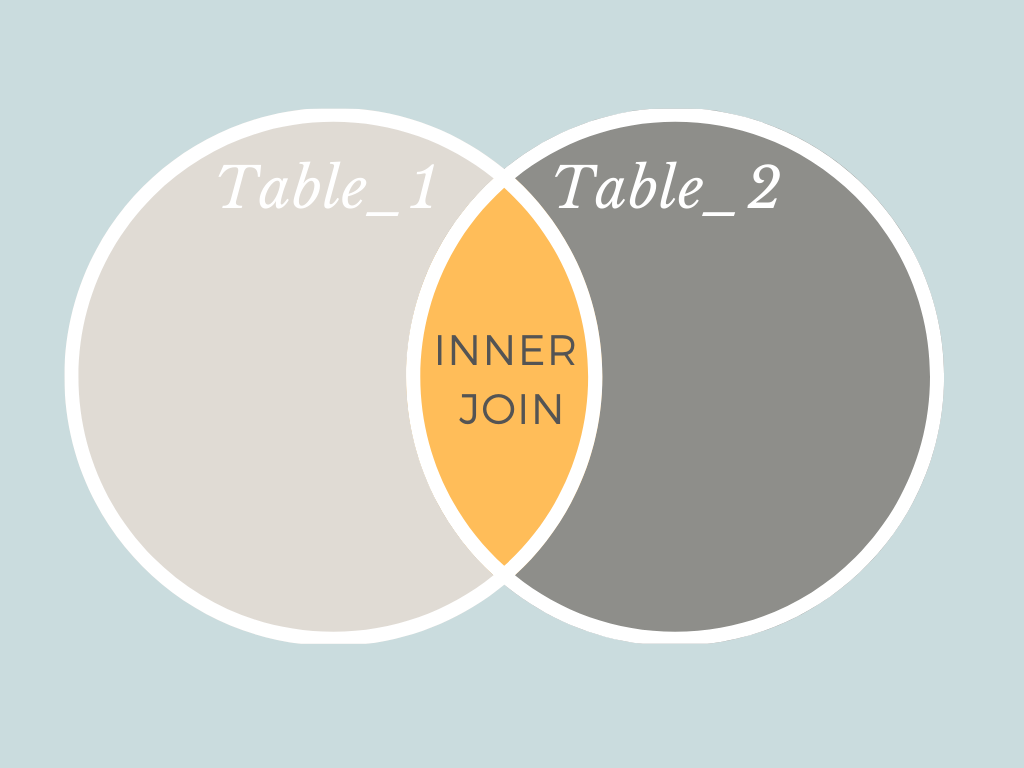
Inner joins return only the parts of two datasets that overlap. So that records will be returned only where there is a matching value in the column you are joining on in both tables. The syntax for an INNER JOIN is shown below:
          SELECT *
FROM
            name_of_table_one
INNER JOIN
            name_of_table_two
ON
            name_of_table_one.name_column_one = name_of_table_two.name_column_one
In the example above, the records from table one and table two would both be returned, but only if the values in column one of table one match the values in column one of table two. Any records that do not have matching values would not be returned by an INNER JOIN.
One part of the join syntax that we have not come across in our lessons before, is referring to a column by both table and column name. This is important when joining tables because both tables could have a column with the same name. If you don't include the table name when selecting columns with the same name, the program will not know which one you are referring to.
To avoid confusion, we use the table name and the column name separated by a full stop to create a unique identifier for each column.
What if you want to join on a matching value, but only want to keep all the data from the left table and only those records that match from the right table?
To join two tables based on a column match without loosing any of the data from the left table, you would use a LEFT OUTER JOIN.
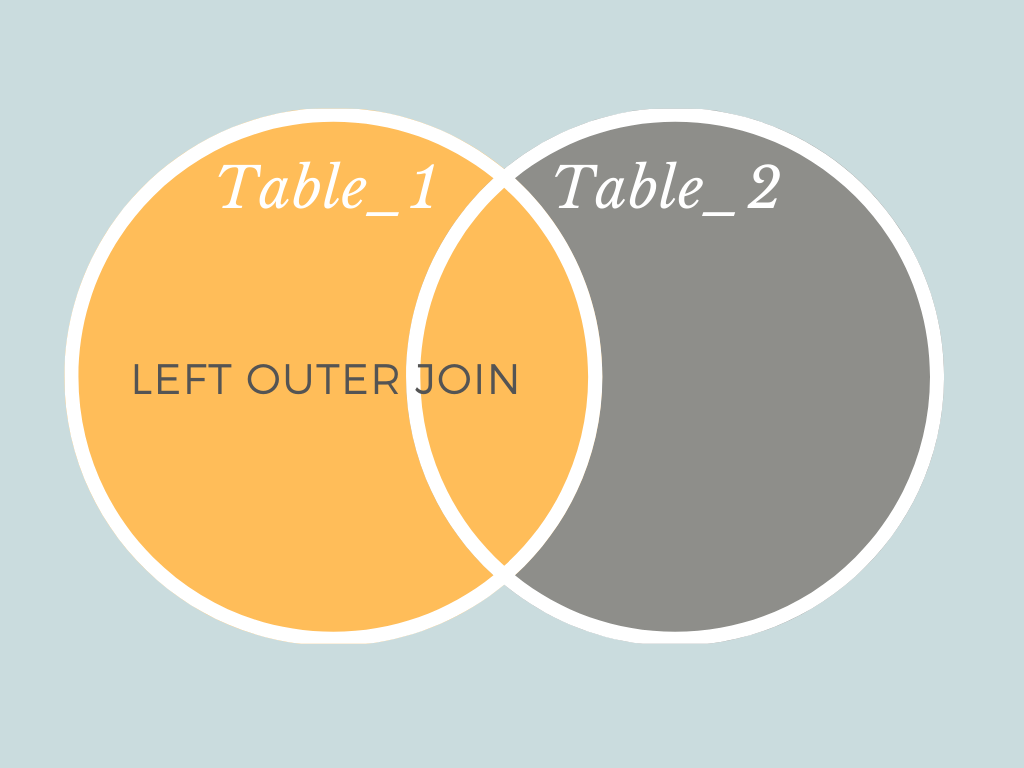
Left outer joins are used when you want to get all the values from one table but only the records that match the left table from the right table.
          SELECT *
FROM
            name_of_table_one
LEFT OUTER JOIN
            name_of_table_two
ON
            name_of_table_one.name_column_one = name_of_table_two.name_column_one
In our LEFT OUTER JOIN example above, all rows from table one will be returned plus the rows that table two had in common with table one based on column one in each table.
What is the difference between a LEFT OUTER JOIN and a RIGHT OUTER JOIN?
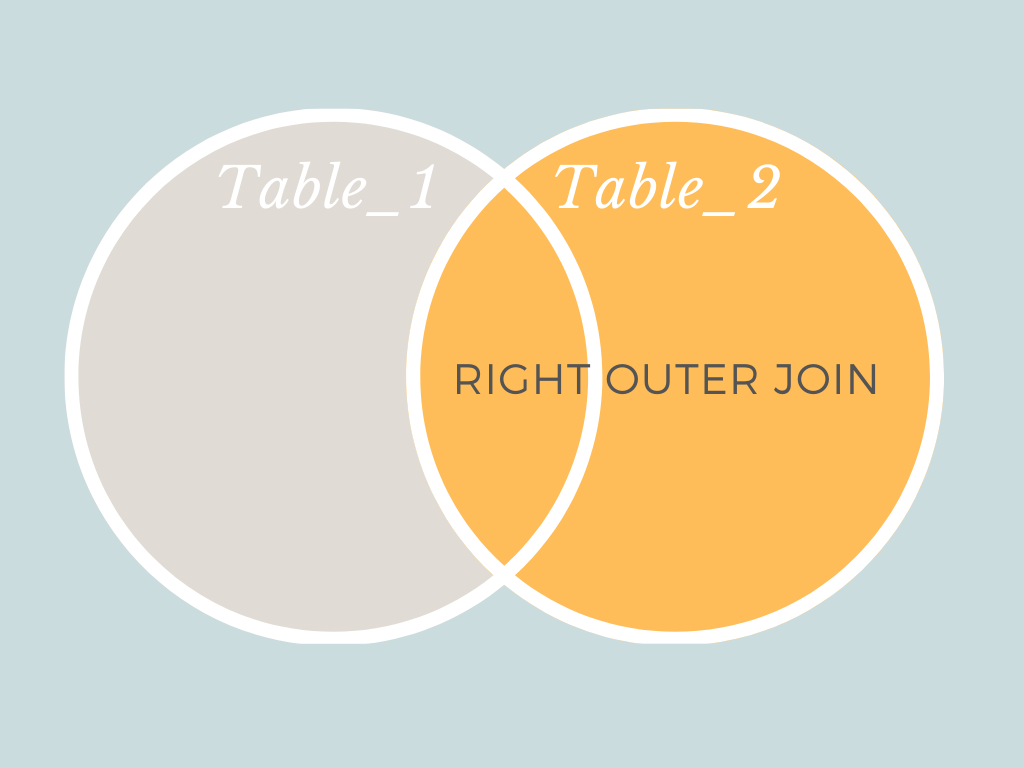
The syntax for a RIGHT OUTER JOIN is the same as for a LEFT OUTER JOIN. The only difference between the two is that the right table, in our example table two, will retain all of its records. Whilst the left table, table one will only keep its records where there is a match between its column one and table two's column one.
          SELECT *
FROM
            name_of_table_one
RIGHT OUTER JOIN
            name_of_table_two
ON
            name_of_table_one.name_column_one = name_of_table_two.name_column_one
Now let's have a go
- Go to https://www.db-fiddle.com/
- In the left hand column put the CREATE TABLE and INSERT INTO queries below
          CREATE TABLE magpie_attacks(
            state_code varchar(255),
            state_name varchar(255),
            animal varchar(255),
            number_of_attacks int(255)
);          INSERT INTO magpie_attacks(
            state_code,
            state_name,
            animal,
            number_of_attacks
)
VALUES
            ('SA', 'South Australia', 'magpie', 154),
            ('VIC', 'Victoria', 'magpie', 972),
            ('TAS', 'Tasmania', 'magpie', 0),
            ('NSW', 'New South Whales', 'magpie', 823),
            ('QLD', 'Queensland', 'magpie', 1141),
            ('WA', 'Western Australia', 'magpie', 287),
            ('ACT', 'Australian Capital Territory', 'magpie', 668)          ;          CREATE TABLE dropbear_attacks(
            state_code varchar(255),
            state_name varchar(255),
            animal varchar(255),
            number_of_attacks int(255)
);          INSERT INTO dropbear_attacks(
            state_code,
            state_name,
            animal,
            number_of_attacks
)
VALUES
            ('SA', 'South Australia', 'dropbear', 21),
            ('VIC', 'Victoria', 'dropbear', 67),
            ('TAS', 'Tasmania', 'dropbear', 30),
            ('NSW', 'New South Whales', 'dropbear', 19),
            ('QLD', 'Queensland', 'dropbear', 40),
            ('WA', 'Western Australia', 'dropbear', 37)
;          CREATE TABLE australian_states(
            state_code varchar(255),
            state_name varchar(255),
            population int(255),
            area_km2 int(255)
);          INSERT INTO australian_states(
            state_code,
            state_name,
            population,
            area_km2
)
VALUES
            ('SA', 'South Australia', 1751693, 1044353),
            ('VIC', 'Victoria', 6594804, 237657),
            ('TAS', 'Tasmania', 534281, 90758),
            ('NSW', 'New South Whales', 8089526, 809952),
            ('QLD', 'Queensland', 5095100, 1851736),
            ('WA', 'Western Australia', 2621680, 2642753),
            ('ACT', 'Australian Capital Territory', 426709, 2358),
            ('NT', 'Northern Territory', 245869, 1419630)
;
3. In the right hand column put your queries and run them using the 'Run' button in the top left
4. Run the query below and see if it returns what you would expect it to:
                      SELECT
            *
            FROM
            magpie_attacks
UNION
            SELECT
            *
            FROM
            dropbear_attacks
;
5. Run the query below and see if it returns what you would expect it to:
                      SELECT
            state_code,
            state_name
            FROM
            magpie_attacks
UNION
            SELECT
            state_code,
            state_name
            FROM
            dropbear_attacks
;
6. Run the query below and compare the results to what you got from the previous query:
                      SELECT
            state_code,
            state_name
            FROM
            magpie_attacks
UNION ALL
            SELECT
            state_code,
            state_name
            FROM
            dropbear_attacks;
7. Run the query below and see if it returns what you would expect it to:
          SELECT
            magpie_attacks.state_code,
            magpie_attacks.number_of_attacks AS magpie_attacks,
            dropbear_attacks.number_of_attacks AS dropbear_attacks
FROM
            magpie_attacks
INNER JOIN
            dropbear_attacks
ON
            magpie_attacks.state_code = dropbear_attacks.state_code;
8. Run the query below and compare the results to the previous query:
          SELECT
            magpie_attacks.state_code,
            magpie_attacks.number_of_attacks AS magpie_attacks,
            dropbear_attacks.number_of_attacks AS dropbear_attacks
FROM
            magpie_attacks
LEFT OUTER JOIN
            dropbear_attacks
ON
            magpie_attacks.state_code = dropbear_attacks.state_code;
9. Run the query below and compare the results to the previous two queries:
          SELECT
            magpie_attacks.state_code,
            magpie_attacks.number_of_attacks AS magpie_attacks,
            dropbear_attacks.number_of_attacks AS dropbear_attacks
FROM
            magpie_attacks
RIGHT OUTER JOIN
            dropbear_attacks
ON
            magpie_attacks.state_code = dropbear_attacks.state_code;
10. Run the query below and compare the results to the previous two queries:
          SELECT
            magpie_attacks.state_code,
            magpie_attacks.number_of_attacks AS magpie_attacks,
            dropbear_attacks.number_of_attacks AS dropbear_attacks,
            dropbear_attacks.number_of_attacks / magpie_attacks.number_of_attacks * 100 AS 'dropbear_attacks_as_percentage_of_magpie_attacks'
FROM
            magpie_attacks
INNER JOIN
            dropbear_attacks
ON
            magpie_attacks.state_code = dropbear_attacks.state_code
;
Exercise 1: Combine the magpie_attacks table and the australian_states table using each of the different union and join methods that we have learned in this lesson. Feel free to select as many or as few columns as you need to in order to make your queries run.
Exercise 2: Write a query to find out which Australian state has the greatest number of magpie attacks as a percentage of the population in that state. Hint: you can use the query in step 10 as a reference if needed.
Learning review
After completing this lesson you should know:
- how to use the keyword UNION to stack datasets without duplicate values
- how to use the keyword UNION ALL to stack datasets with duplicate values
- how to use the keyword INNER JOIN to join two tables together and only get the overlapping values
- how to use the keyword LEFT OUTER JOIN to join two tables together and not loose any data from the left table that does not have a match in the right table
- how to use the keyword RIGHT OUTER JOIN to join two tables together and not loose any data from the right table that does not have a match in the left table
- understand the difference between the UNION and UNION ALL KEYWORDS
- understand the difference between an INNER JOIN, LEFT OUTER JOIN and RIGHT OUTER JOIN.
Next Lesson
Next lesson will be a review of all we have learned in the last 5 lessons on SQL. I always think it is a good idea to practice new skills to consolidate the lessons. Hopefully the review lesson will also let us use all the skills learned over the lessons in a more independent way. Up till now the exercises have been fairly similar to the examples that preceded them. However, I am hoping that part of what we will learn next lesson is how to choose what methods to use in order to solve the problems.
In addition to data, my other passion is painting. You can find my wildlife art at www.katemarielewis.com
All Lessons in the learning data science while socially distancing (LDSWSD) series
Source: https://towardsdatascience.com/combining-tables-using-sql-f6ddfd5f8b6f
0 Response to "Easy Dat a Sets to Link Together"
Post a Comment